How to scrape Telegram channels: The complete guide to extracting posts, media, and metadata

Telegram has evolved into a global powerhouse for real-time information, hosting over 1 billion active users in 2026. From niche specialized groups to massive news broadcasts with millions of subscribers, the platform is a goldmine for market researchers, AI developers, and competitive intelligence analysts. However, the platform is notoriously difficult to scrape. Its data is locked behind a mobile-first interface and strictly protected by anti-bot measures.
Manual data collection doesn't scale in today's era of automation. If you are trying to monitor trends across a hundred channels or build a dataset for a large language model, you need an automated solution. This is where Telegram Channels Scraper comes in.
In this walkthrough, we will show you how to use this advanced Apify Actor to extract everything from message text and timestamps to direct media links and engagement metrics.
Why scrape Telegram data in 2026?
Telegram is more than just a messaging app. It is a news agency, a marketplace, and a community hub. Telegram has been referred to as a "Global Digital Hub". As of 2026, Telegram has evolved far beyond a simple instant messaging tool into a massive, multifaceted digital ecosystem. It serves as a "super-app" combining social networking, information, and commerce, particularly popular for its algorithm-free broadcast capabilities.
Organizations and individual developers are increasingly looking for ways to "unlock" this siloed data for several key reasons:
1. Market research and competitive intelligence
In many industries, specifically crypto, finance, and tech, Telegram is where news breaks first. By scraping competitor channels, you can monitor their announcements, track which content resonates with their audience based on reaction counts, and analyze their growth through subscriber metrics.
2. Dataset building for AI and NLP
Generative AI models are only as good as the data on which they are trained. Telegram provides high-quality, real-time human conversation in dozens of languages. It is an ideal source for training sentiment analysis models or building niche-specific knowledge bases for AI agents.
3. Content monitoring and automation
Many businesses use Telegram scrapers to feed external dashboards or notification systems. For example, a financial analyst might scrape various "trading signals" channels to consolidate all data into a single, searchable database or a Slack notification bot.
4. Audience behavior and sentiment analysis
Understanding which emojis (reactions) users use in response to specific news can provide deep qualitative insights into brand sentiment. Tracking views per post relative to the total subscriber count helps calculate actual engagement rates.
What is the Telegram Channels Scraper?
Telegram Channels Scraper is a powerful, production-ready Apify Actor designed to extract structured content from public Telegram channels. Unlike many other tools that require you to manage your own proxies or deal with complex API authorizations, this Actor handles the technical heavy lifting for you.
Key features of the tool
- QR code self-authentication: No developer API keys needed. Users authenticate with their own Telegram account by scanning a QR code directly in the console — just like linking a desktop device.
- Session string persistence: After scanning the QR code once, the Actor outputs a reusable session string. Paste it into the input on future runs to skip the login step entirely.
- Full engagement metrics: Extract views, reaction counts, and post links.
- Media extraction: Get direct download links for images, videos, and documents.
- Developer-friendly: Includes a built-in FastAPI server for real-time requests and support for Model Context Protocol (MCP) to integrate with AI agents like ChatGPT or Claude.
- Pay-per-result pricing: The Actor uses Apify's Pay-Per-Event model — you only pay for what you actually get, making it highly cost-effective for both small and large-scale projects.
What data can you extract?
The Actor produces a clean, structured JSON output (also exportable to CSV, Excel, or XML). Here is the data you can expect for every post:
| Field | Description |
|---|---|
| Channel Name | The display name of the Telegram channel. |
| Username | The @handle of the channel. |
| Bio & Subs | The channel's description and current subscriber count. |
| Post ID & Link | The unique identifier and direct URL to the message. |
| Date | ISO-formatted timestamp of the post. |
| Text | The full text content of the message. |
| Views | Number of views at the time of scraping. |
| Reactions | An object containing counts for every emoji used (e.g., 👍, ❤️, 🔥). |
| Media Type | Whether the post is text-only, a photo, a video, or a document. |
| Media URLs | Direct links to the media files. |
Step-by-step walkthrough: Extracting your first dataset
Getting started with Apify Actors is easy. You don't need to write a single line of code unless you want to integrate the results into your own application.
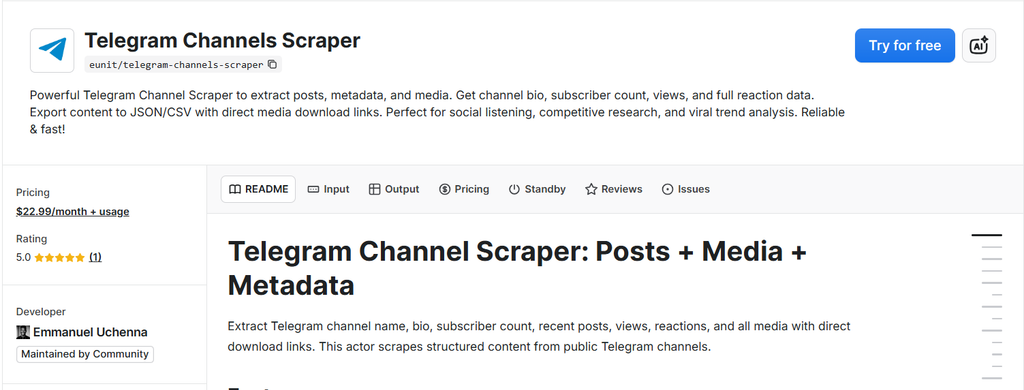
Step 1: Find the Actor on Apify Store
Navigate to the Telegram Channels Scraper page. If you don't have an Apify account yet, you can sign up for free in just a few seconds.
Step 2: Configure the input
Once you are on the Actor page, click on the Input tab. You will see these fields:
- Channels: Enter a comma-separated list of the channel usernames or links you want to target. For example:
@svtvnews, https://t.me/cryptninjas. - Limit: Decide how many posts you want to extract from each channel. If you need the most recent news,
10or20is usually enough. For historical research, you can set this higher. - Days back: Specify how far back in time you want to go. This ensures you don't waste resources on outdated content if you only care about the last 3 days.
- Saved Session String (optional): Paste a previously generated session token here to skip the QR login on repeat runs.
- 2FA Password (optional): If your Telegram account has Two-Step Verification enabled, provide it here so the Actor can complete the login automatically.
Telegram Channels Scraper configuration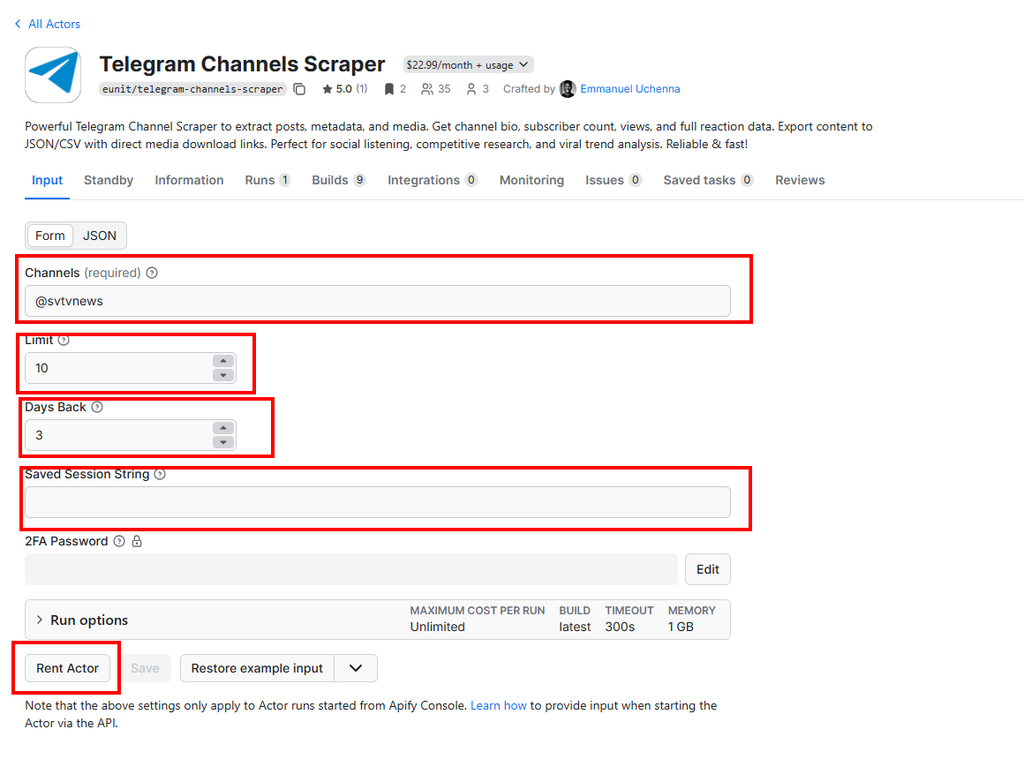
Step 3: Authenticate with QR code (first run only)
On your very first run — or when no session string is provided — the Actor will display a QR code directly in the Log tab of the Apify Console. This is how you authenticate:
- Open Telegram on your mobile device.
- Go to Settings → Devices → Link Desktop Device.
- Scan the QR code shown in the log.
Once scanned, the Actor logs your session string prominently in the console and also saves it to the Key-Value Store under the key SESSION_STRING. Copy it and paste it into the Saved Session String input field — all subsequent runs will skip the QR prompt entirely.
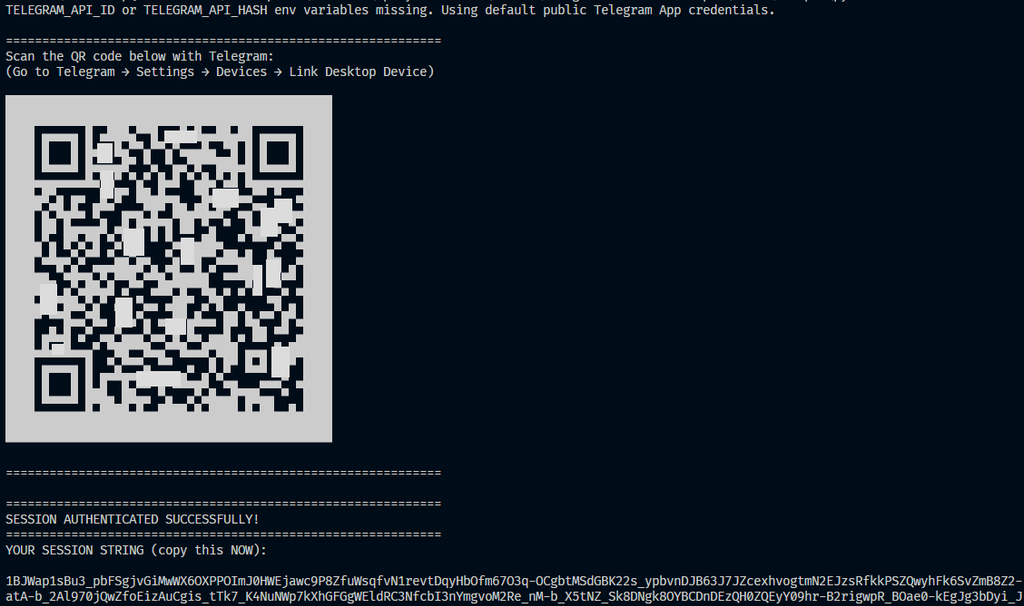
Telegram QR code from the Apify console
Note: The QR code automatically refreshes every 30 seconds if not scanned. The Actor will regenerate it up to 10 times, so you have plenty of time.
Step 4: Run the Actor
Click the Start button at the bottom of the page. You will be redirected to the Runs tab, where you can see the log in real-time. The Actor will connect to Telegram, navigate to the specified channels, and push the data into your default dataset.
Step 5: Download your results
When the run finishes, navigate to the Storage tab. You can preview the data in a table format or download it in your preferred format. Most users find CSV or Excel to be the best formats for analysis, while developers typically prefer JSON.
Telegram Channels Scraper results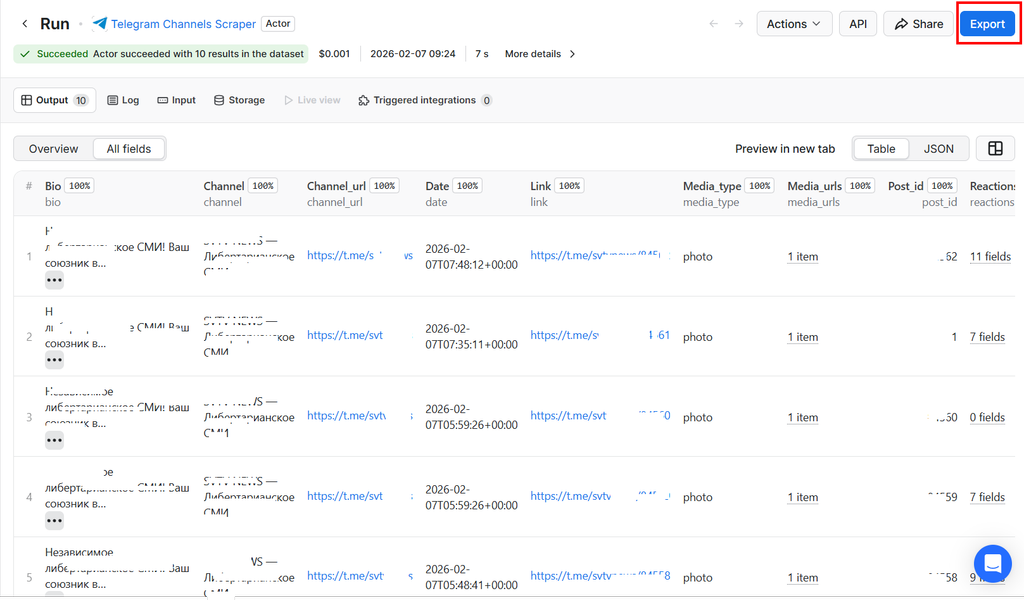
Advanced features for power users
This Actor is built for scale. If you are a developer or a business with high-volume needs, you can leverage its advanced capabilities.
Real-time scraping via API (Standby mode)
The Actor supports Standby mode. This means you can keep the Actor running in the background and send it HTTP requests whenever you need data. Instead of waiting for a container to boot up, you get an immediate response.
You can trigger a scrape by sending a POST request to the Actor's standard URL with the following JSON body:
{
  "channels": "@example_channel",
  "limit": 5,
  "daysBack": 1,
  "session": "YOUR_SESSION_STRING_HERE"
}
AI integration with MCP
In the era of AI agents, data extraction needs to be "AI-readable". This Actor supports the Model Context Protocol (MCP). This allows AI tools like Claude Desktop or custom GPTs to "call" the scraper as a tool. You can ask your AI, "What are the top 5 news posts from the last 24 hours on @svtvnews?" and it will use the Actor to fetch the data and summarize it for you.
Pay-Per-Event pricing: you only pay for what you get
The Actor uses Apify's Pay-Per-Event (PPE) monetization model, meaning the cost is tied directly to your results:
- Actor start: A small flat fee is charged once per run to cover Telegram connection and authentication overhead.
- Per result: A charge is applied for each post successfully scraped and pushed to your dataset.
Critically, the Actor is built to respect your budget limit. The moment you reach the maximum charge you have configured, the Actor stops scraping immediately — it will never do work beyond what you have agreed to pay for. This makes it far more cost-predictable than time-based or flat-rate pricing models.
Why use Apify Actors instead of building your own scraper?
You might be tempted to use a library like Telethon or Pyrogram to build your own script. While this works for hobby projects, it quickly breaks down in production:
- Anti-blocking: Telegram is very aggressive with "Too Many Requests" (FloodWait) errors. Apify Actors include logic to handle these delays gracefully.
- No infrastructure to manage: You don't need to worry about Docker containers, server costs, or task scheduling. Apify Cloud manages everything.
- Easy scaling: Whether you want to scrape one channel or ten thousand, the platform scales the resources automatically.
- Standardized data: No need to spend hours cleaning messy HTML or inconsistent JSON responses.
Use cases in action
Scenario A: The crypto trader
A crypto trader wants to monitor sentiment on the "CryptoNinjas" channel. By scraping the reaction counts for every post, they can determine if a specific announcement is being received positively (lots of 🔥 and 👍) or negatively (lots of 🤡 or 🤬). They utilize the Apify API to fetch this data hourly and feed it into a sentiment score dashboard.
Scenario B: The news aggregator
A media startup wants to create a consolidated feed of information from various independent news channels. They use the Media URLs provided by the Actor to automatically download photos and videos, which they then republish on their own platform (respecting copyright and platform terms, of course).
Scenario C: The academic researcher
A sociology student is studying the spread of specific political narratives. They use the scraper to download 5,000 posts across various community channels. Because the data is delivered in a clean CSV format, it can be immediately uploaded to a data analysis tool, like NVivo or R, for qualitative coding.
Best practices for responsible scraping
When using any web scraping tool, it is important to be a good "web citizen":
- Respect rate limits: Don't try to scrape millions of posts in a single second. Use the Actor's built-in limits to stay under the radar.
- Public data only: Only scrape data from public channels. This Actor is not designed to violate privacy or access private messages.
- Adhere to GDPR and CCPA: If you are collecting data that contains usernames, ensure you are handling this information in compliance with local data protection laws.
- Keep your session string private: Your session string grants full access to your Telegram account. Never share it publicly or commit it to source control.
Wrapping Up
The days of manually scrolling through Telegram channels to find the information you need are now behind us. With Telegram Channels Scraper, you can turn the world's most popular messaging app into your own structured database — all authenticated with nothing more than a QR code scan.
Whether you are building the next big AI model, monitoring your competitors, or just trying to stay organized, our tool provides the reliability and depth of data you need to succeed.
Try Telegram Channels Scraper on Apify today and get ahead of your competitors!
FAQ
Do I need a Telegram account to use this? Yes, a Telegram account is required for authentication. However, the process is frictionless — you simply scan a QR code on your first run, just like linking Telegram Web. No API keys, no developer credentials.
Do I need to create a Telegram Developer App?
No. The Actor uses built-in Telegram credentials by default, so you don't need to register at my.telegram.org or generate an api_id / api_hash. If you prefer to use your own credentials for extra reliability, you can optionally set TELEGRAM_API_ID and TELEGRAM_API_HASH as environment variables (as a developer).
What is the session string and how do I save it?
After your first QR code login, the Actor prints a session string in the log. This string lets you re-authenticate on future runs without scanning the QR code again. Copy it from the log (or retrieve it from the SESSION_STRING key in your run's Key-Value Store) and paste it into the Saved Session String input field.
Is it legal to scrape Telegram? Extracting publicly available factual data is generally considered legal. However, you should always check Telegram's Terms of Service and consult with legal counsel if you are unsure about your specific use case.
Can I export the data to my CRM? Yes. Since Apify provides a robust API and integrations with platforms like Zapier and Make, you can automatically send your scraped Telegram data to Salesforce, HubSpot, or even a simple Google Sheet.
What formats do you support? The Actor supports JSON, CSV, Excel (XLSX), XML, and HTML table formats.

Emmanuel Uchenna
@eunit99Hi, I’m Emmanuel Uchenna — a frontend engineer, technical writer, and digital health advocate passionate about building technology that empowers people. With over five years of experience, I specialize in crafting clean, scalable user interfaces with React, Next.js, and modern web tooling, while also translating complex technical ideas into clear, engaging content through articles, documentation, and whitepapers.